Small Update, Big Difference: Search Now Understands Card Numbers
At JustTCG, we spend a lot of time thinking about how to save you a few lines of code. We know that building a great TCG app often requires a lot of “glue code” , those annoying little functions you have to write just to get data to behave.
Share this article

We just pushed an update to our search logic that removes one of those headaches: handling card numbers.
The Problem: Databases are Literal, Collectors are Not
If you have built a search bar for a TCG app, you have likely run into this friction point. A user wants to find a specific card, so they type:
“Larvesta 15”
But in a strict database environment, that card is actually stored as:
“Larvesta — 015/086”
Previously, searching “Larvesta 15” might return zero results because of the missing leading zero or the formatting mismatch. To fix this, you usually have to write your own regex parsers or middleware to “clean” the user’s input before sending it to the API.
The Fix: We Handle the Normalization
We updated the JustTCG API to “think” a bit more like a collector. We now handle the number normalization on our end so you don’t have to.
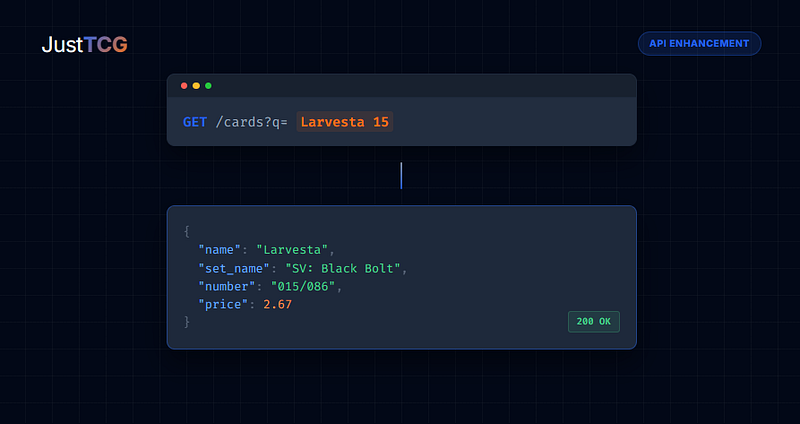
1. Smart Text Search You can now pass natural queries directly into the q parameter. If a user types Larvesta 15, our system separates the name from the number and finds the correct card, even if the strict print number is 015.
2. The “Leading Zero” Logic We now treat 5, 05, and 005 as the same value. Whether your user inputs a single digit or the full print sequence, the API will return the correct card.
3. Precision Mode For those building strict inventory tools or high-volume scanners (we see you, arbitrage hunters), we also added a dedicated number parameter. This allows you to filter specifically by the card number column for exact matches.
See it in Action
This update is live right now. You don’t need to change your integration to benefit from the smart search, but you can start using the precision parameter immediately.
Smart Text (Implicit): GET /cards?q=Larvesta 15 Result: Returns Larvesta - 015/086
Explicit Filter: GET /cards?q=Larvesta&number=15 Result: Returns Larvesta - 015/086
It’s a small change, but it means you can delete that string manipulation function you wrote last week and focus on building features your users actually care about.
Happy coding.
Documentation: https://justtcg.com/docs
Sign up for a free API key: https://justtcg.com
Tags:
JustTCG Editor



Share this article